Shop.co — online clothing store design concept
Shop.co Concept is an online clothing store design built around a fictional brand: product hierarchy, shopping by style and a short path to checkout. The home page is made of seven blocks and eight product cards with prices and ratings.
Challenge
Shop.co Concept is a design concept rather than a live store or a client commission: the brand and range in the mock-ups are fictional. We designed an online store of casual, formal, party and gym clothing for men and women that inspires with looks and still takes a shopper from the storefront to checkout quickly.
Online clothing store design has two jobs at once: it has to inspire with looks and still get people to a purchase quickly. In this concept we looked for the balance between showcase and convenience on a fictional store, Shop.co, with no real brand, stock or sales, but with the full shopper journey.
A clothing range has many layers: new arrivals, best sellers, discounted items, brands, styles and occasions. Show everything at once and the home page turns into a noisy feed with nothing for the eye to hold on to. The concept needed a clear hierarchy: what to see first, what second and where to click once an item appeals.
The product card is the main working element of a clothing catalogue. From it a shopper decides in a second whether to open an item, so it needs a photo, a name, the price, the size of the discount and other shoppers' opinion. All of that has to fit into a compact card and read the same way in every feed.
Finally, there is the path from a liked item to an order. Catalogue filters, the basket and checkout have to stay short on both desktop and mobile: every extra step or awkward field on a small screen raises the chance that the person closes the tab.
Solution
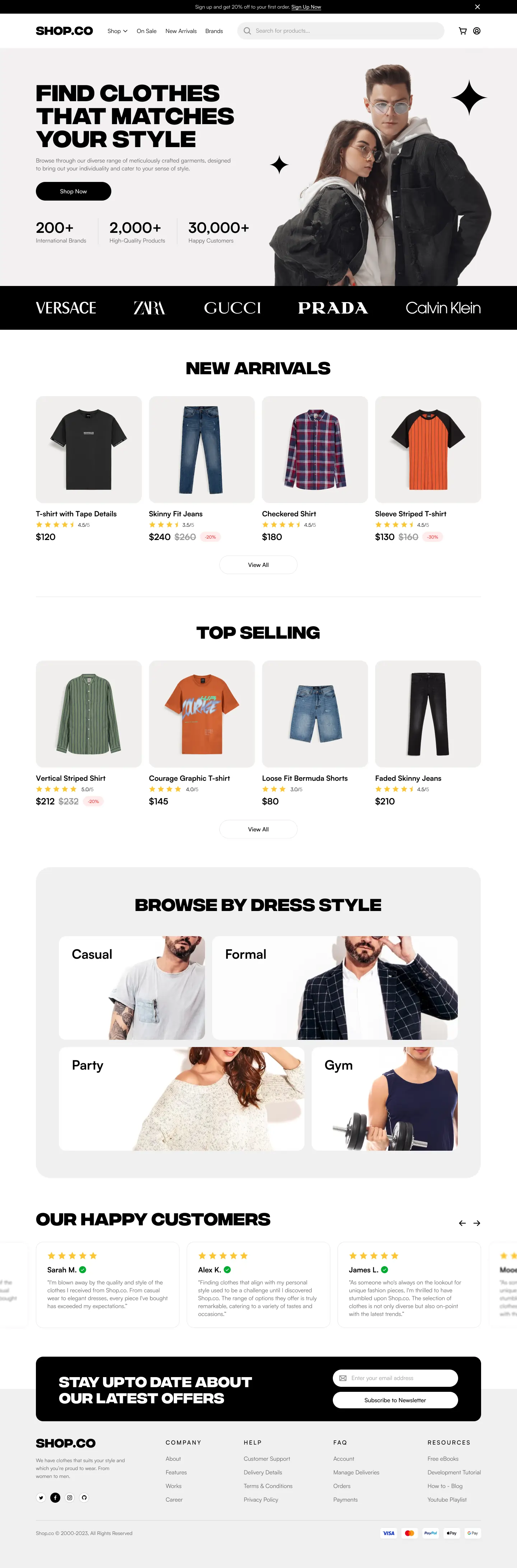
The home page is organised as a feed with a clear hierarchy: a sign-up offer bar, a large first screen with a single button, a row of brands, New Arrivals, Top Selling, shopping by style, reviews and a newsletter sign-up. Each block answers one shopper question and ends with an obvious action.
A card shows the item on a neutral background, the name, a star rating with a score, the price, the crossed-out old price and a discount badge, so products can be compared right in the feed. Shopping by style leads to a filtered catalogue, and from there a short path runs through the basket to a checkout that is also designed for a mobile screen.
The concept was built in Figma from recurring components: product and review cards, pill buttons, discount badges, the search and newsletter fields. The palette is black and white so that colour comes from the clothes themselves, and contrasting type, a wide upper-case grotesque for headings and a calm face for text, keeps the rhythm of a long page.
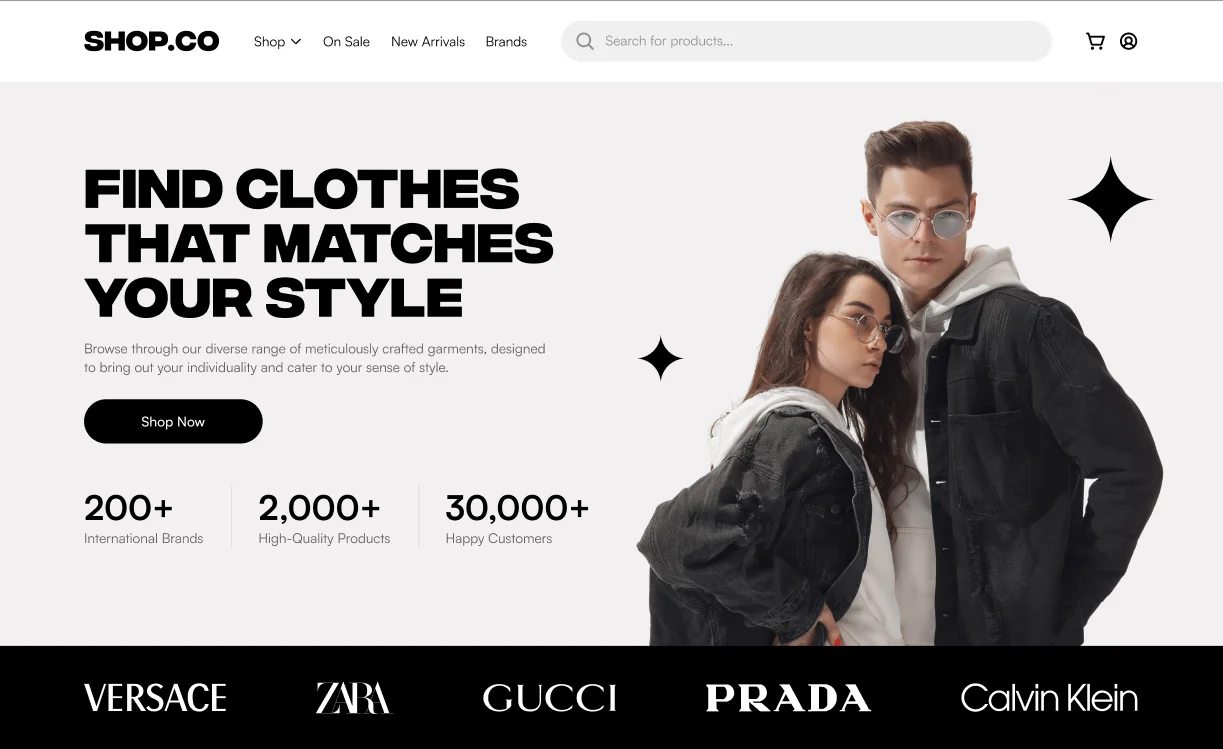
A first screen with one button
A large upper-case headline, a short explanation and a black Shop Now button sit on the left, with a photo of a couple in denim jackets on the right. Below the button runs a row of store figures, and above the header there is a dismissible bar with a sign-up discount offer.
New arrivals and best sellers
Two rows of four items show fresh arrivals and the most popular pieces. Each row ends with a View All button leading to the full catalogue, so the home page stays light while the whole range remains one click away.
A product card built for comparison
The item is shot on a light grey background, with the name, a star rating with a numeric score, the price, the crossed-out old price and a red discount badge beneath it. All cards share one size, so prices and scores are easy to compare along a row.
Shopping by dress style
The Browse by Dress Style block is a bento grid of four photo cards of different widths: casual, formal, party and gym. A shopper picks an occasion rather than a menu category and lands straight in a matching selection.
Reviews and a newsletter
The review carousel shows a rating, a name with a green verified-buyer tick and the text, while the outer cards run off the screen edge to hint at scrolling. Below sits a black newsletter block with an email field that overlaps the footer by half.
A short path to checkout
Product search, the basket and the profile icon stay in the header at all times, while the filtered catalogue, basket and checkout are designed with a mobile screen in mind. The footer gathers help, delivery, orders and payments, and payment system badges answer the question of how to pay.
Results
The project's key outcomes in numbers.
- 8Product cards on the home page
The New Arrivals and Top Selling rows hold four items each, with a price, rating and discount badge.
- 4Dress styles to shop by
Casual, formal, party and gym: choosing by occasion rather than by category name.
- 7Home page blocks
First screen, brands, new arrivals, best sellers, styles, reviews and newsletter follow the order of a buying decision.
- 12 daysWork on the concept
The store structure, components and Figma mock-ups took twelve days.
Design & interfaces
Key screens and interfaces of the project.
Project tech stack
The stack we used to build the solution for the client's task.
- Figma
Similar cases

Ready to become the next case?
Tell us about your task — a manager will assemble the team, calculate the estimate and send a proposal within the first hour after the request. No obligations, no drip campaigns.